Recording Phone Calls with Wave
Place recorded phone calls from Wave, or pull an in-progress call into a recording — with a transcript and summary waiting for you afterward.
Wave records phone calls the same way it records meetings — with a transcript, speaker labels, and an AI summary waiting in your library afterward. You can dial from Wave, or pull a call you're already on into a recording. Both work on your phone, at app.wave.co, and in the Wave desktop app.
First: verify your number
Wave dials from your own number, so the person you call sees a number they recognize. Wave confirms the number is yours once, using an automated call.
Open the Phone tab and tap Verify Your Number.
On Verify Your Phone Number, pick your country and type your number, then tap Call Me to Verify.
Wave shows a code and "Your phone will ring shortly". Answer the call and type that code on your keypad.
Verification completes on its own, then Wave offers Save Wave to Contacts — tap Add to Contacts so future Wave calls show up by name, or Skip.
If nothing rings within 90 seconds, Wave shows Verification Timeout with a Try Again button.
Verification is one-time. To switch or disconnect a number later, use the Caller ID row above the keypad — Change Number and Remove Number on your phone, Change number and Remove number on Desktop.
Place a recorded call
Go to the Phone tab — also reachable from Phone Call in the record button menu or the Record Phone Calls header on your Waves list — and stay on Keypad. Dial, paste a number, or tap the contacts icon to pick someone.
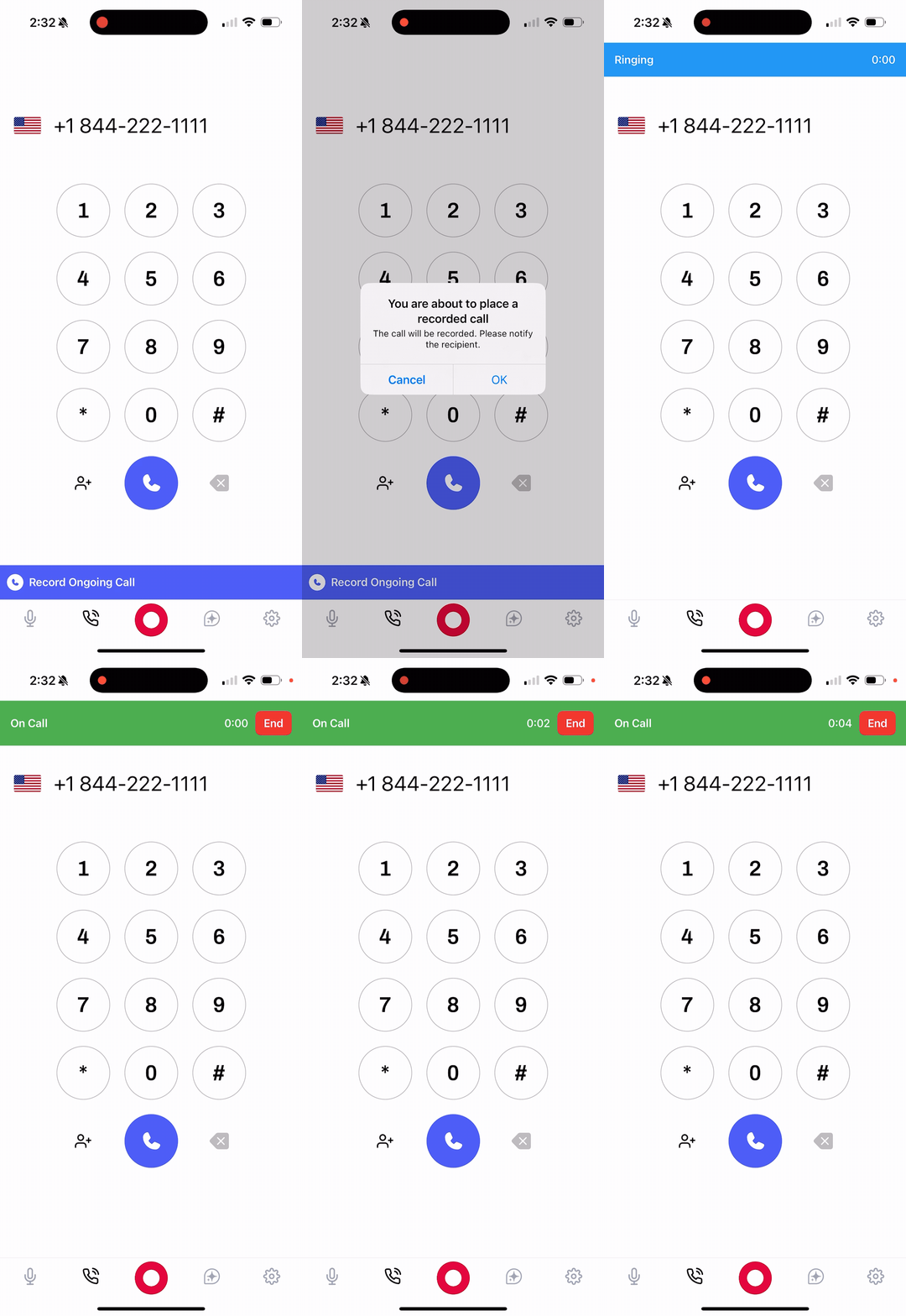
Tap the green call button. Wave confirms with You are about to place a recorded call — "The call will be recorded. Please notify the recipient." Tap OK to dial.
The call runs inside Wave, so you'll see Connecting..., then Ringing..., then a timer with Recording next to it. The status bar has a speaker toggle and a hang-up button.
Record a call you're already on
Already on a call? Wave calls you, you merge the two calls, and everything from the merge onward is recorded.
Without hanging up, open the Phone tab and tap Record an Ongoing Call (below the keypad). Wave explains what's about to happen — tap Continue, then:
- Answer the incoming call from Wave
- Put your current call on hold
- Merge the calls when prompted
The status bar shows Connecting bridge..., then Wave is calling you..., and the caller reads Wave Bridge. Recording starts once merged.
You can also start the bridge without opening the app: long-press the Wave icon and choose Record Ongoing Phone Call on iPhone, or Record Phone Call on Android. On iPhone, asking Siri for Start Wave Phone Bridge does the same thing. See Siri shortcuts and quick actions.
Merging requires three-way calling on your carrier plan. On iPhone, tap Merge Calls after answering Wave; on Android, look for Merge or Conference. If your call screen has no merge option, your carrier doesn't support it and the bridge won't work — dial from Wave instead.
After the call
Wave uploads, transcribes, and summarizes the call automatically, and it lands in your library as a Phone Call session — searchable alongside everything else. See what happens after you record for the full pipeline, and Voice ID for naming the speakers.
Calls also show under Recents (Recent on Desktop). Tap a completed call to open its session; calls that never connected are listed with their outcome — Busy, No answer, Declined, Canceled — and produce no recording.
Recording consent
Recording laws vary by location — some places need only one party to know, others need everyone on the call to agree. Wave reminds you before each call, but complying with the law where you and the other party are is on you. Safest habit: say you're recording, at the start, every time.
Troubleshooting
The call won't start. You need an internet connection, a verified number, and an active Wave plan (see plans and pricing). On the web, also allow the browser microphone.
An international number is blocked. Wave blocks destinations costing more than $0.20 per minute, so premium-rate lines won't dial. Standard mobiles and landlines are fine. Some Caribbean numbers share the +1 prefix but price as international, so they're checked too.
Too many international calls. International calling has hourly and daily caps to stop toll fraud, tighter for brand-new accounts. Calls to the US and Canada aren't capped.
Wave never called you for the bridge. Check that your carrier allows incoming calls while you're on one, and answer promptly. If nothing arrives, try again from the Phone tab.
FAQ
No. They see your verified number on caller ID and it sounds like any other call. Telling them it's being recorded is on you.
Not directly — but answer it on your phone, then start Record an Ongoing Call and merge Wave in to record the rest.
Wave uses your verified number. Tap the Caller ID row above the keypad and choose Change Number to switch between the numbers you've verified.
Was this article helpful?
Still need help?