Wave Guests
Email the meeting summary to the people who were on the invite — automatically, the moment the recording finishes processing.
Guests are the people from a meeting invite who get the summary emailed to them when your recording finishes processing. You pick them from the calendar event's attendee list — no copying addresses, no follow-up message to write. Guests don't need a Wave account.
Wave Guests needs a connected Google or Outlook calendar, because that's where the attendee list comes from.
Pick guests while you record
When a calendar event is happening right now, Wave surfaces its attendees so you can check off who should receive the notes.
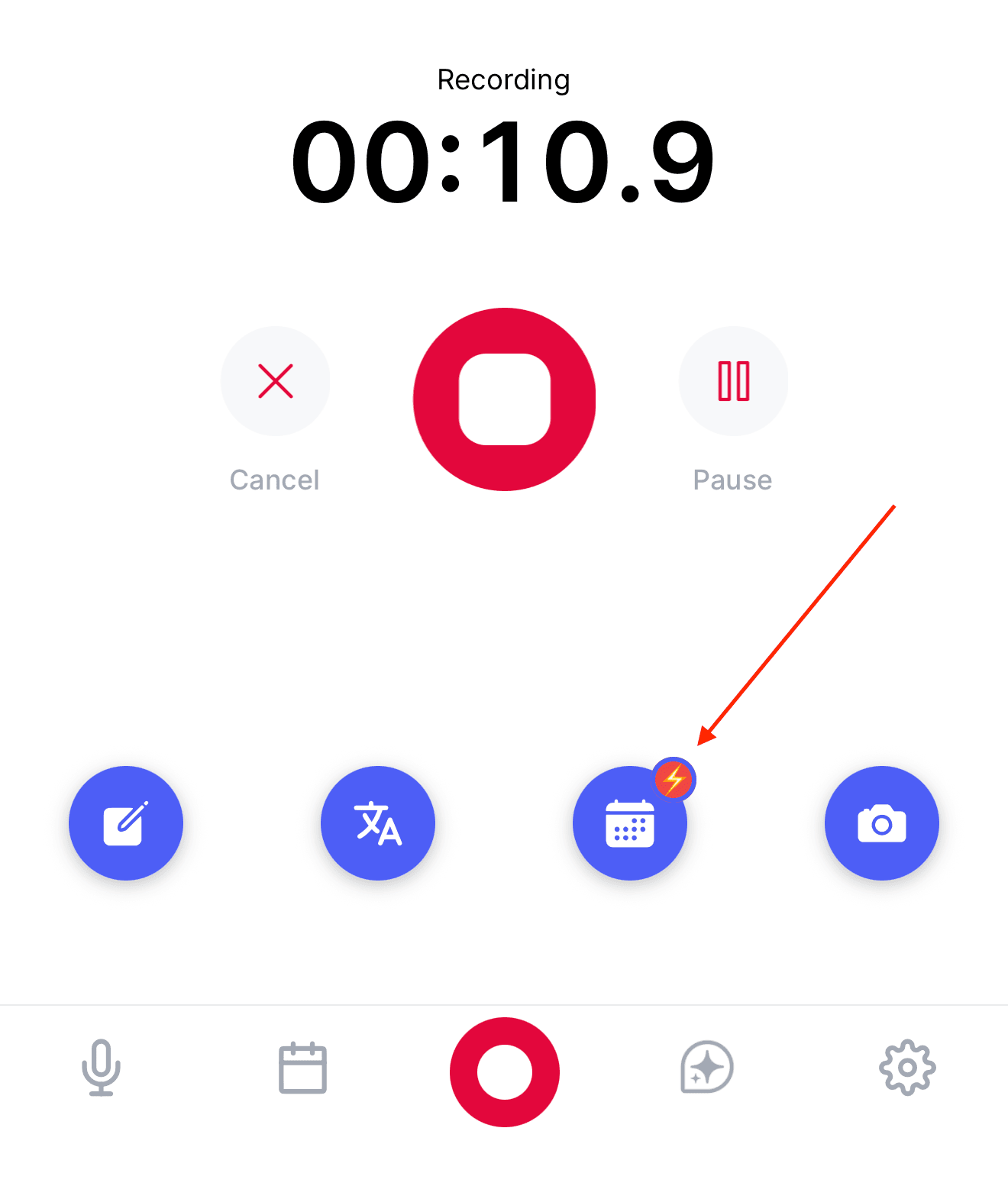
Start a recording during the meeting. Under Session tools on the recording screen, tap Guests.
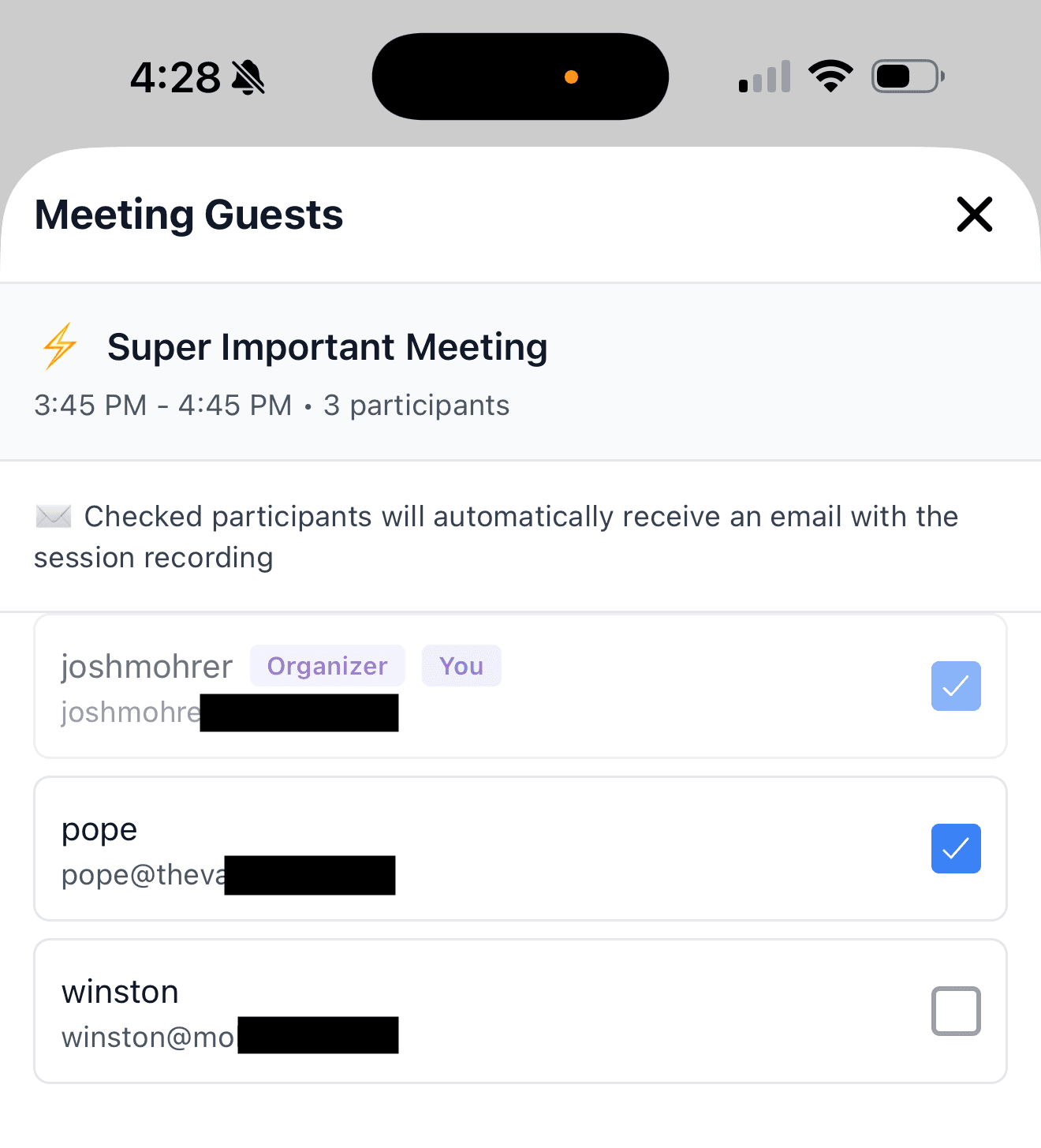
The Meeting Guests screen opens with the current event at the top and its attendee list below — the Organizer and You are labeled.
Tap anyone you want to email. "Checked participants will automatically receive an email with the session recording."
Your choices save as you tap, so there's no Save button to hunt for. Close the screen and keep recording.
If you haven't connected a calendar you'll see No Calendar Connected with a Connect Calendar button. If you have, but nothing on your calendar is running right now, you'll see No Ongoing Meeting.
Guests only appear while a calendar event is actually in progress. If the recording doesn't overlap an event, there's no attendee list to pull from.
Email every attendee automatically
If you'd rather not choose every time, turn on one setting and Wave fills the guest list from the calendar invite for every meeting it records.
Go to the Meetings tab, open Calendar & Bot Settings, and under Email Notifications turn on Send notes to all attendees ("Share notes with everyone in the meeting").
The setting is per account, not per meeting. It applies to meetings the Wave bot recorded from your calendar — for recordings you make yourself during a meeting, and for bots you send by link, check the guests by hand as described above. Your own address is always filtered out before the emails go, so you never get a guest copy of your own meeting.
What guests receive
Each guest gets one email from Wave at support@wave.co, with the subject "Your Name shared: Meeting Title". It contains:
- The AI summary of the meeting
- Any action items Wave pulled out
- The full transcript, unless you've turned Include transcript off in Settings → Auto-share
That's the whole delivery. Guests get that one meeting and nothing else — no account, no login, no ongoing access to your library. Tell people to whitelist support@wave.co if the email doesn't arrive.
FAQ
No. The summary arrives as a normal email they can read anywhere.
Wave removes your own address — and any alternative emails on your account — from the guest list, so you're never emailed as a guest of your own meeting. To get every finished session in your inbox, turn on Auto-send completed sessions in Settings → Auto-share. See emailing your Wave summaries.
Not through Guests — that list comes straight from the calendar event. Share the session directly instead: see sharing and exporting your Wave sessions. In the desktop app, Send via email in the share modal accepts any address you type.
Guest emails go out once, as soon as processing finishes, so set the list while you're still recording. Afterwards, share the session manually to reach anyone you missed.
Wave only sees attendees the calendar invite actually has. A meeting you created with no invitees, or an event synced without attendee details, will show "No attendees found for this meeting." Check that the event has guests in Google Calendar or Outlook, then reopen the screen.
Was this article helpful?
Still need help?